
How do I change my Google Play country or region on Android?
If you’re unable to find or download the Kite app, your Google Play country may be set to a different country.
Follow these steps to check and update your country:
- Open the Google Play Store app.
- Tap your profile picture in the top-right corner.
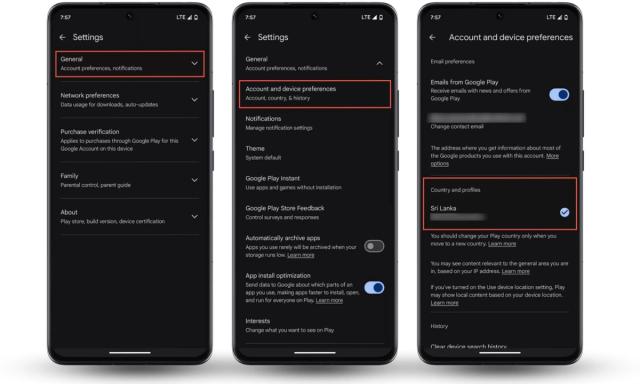
- Tap Settings.
- Tap General.
- Tap Account and device preferences.
- Under Country and profiles, check your current Play Store country.
- Select the country you want to switch to and follow the on-screen instructions.
Important: Google Play may only show the option to change your country if you’re currently in that country. You may also need to add a payment method from the new country. It can take some time for the change to take effect.
Still can’t download Kite?
After changing your country:
- Close and reopen the Google Play Store.
- Search for Kite: Stablecoin Finance.
- If you still can’t find the app, try restarting your Android device.
- If the issue persists, contact us at care@kiteapp.xyz.
Was this helpful?