
How do I change my iOS App Store country or region on iPhone?
If you’re unable to find or download the Kite app, your App Store country or region may be set to a different country.
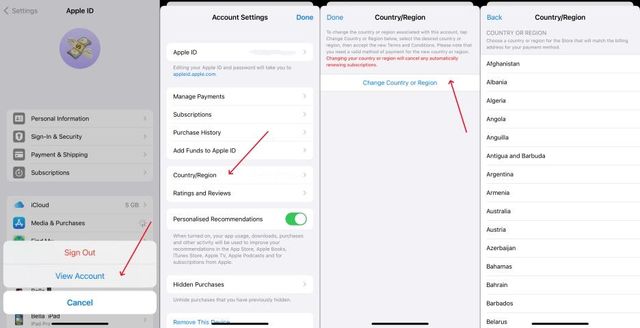
Follow these steps to check and update your country or region:
- Open the Settings app on your iPhone.
- Tap your name / Apple Account at the top.
- Tap Media & Purchases.
- Tap View Account.
- Tap Country/Region.
- Check your current country or region and change it if needed.
Tip: You may need to meet Apple’s requirements before changing your country or region, such as cancelling active subscriptions or using any remaining Apple Account balance.
Still can’t download Kite?
After changing your country or region:
- Close and reopen the App Store.
- Search for Kite: Stablecoin Finance.
- If you still can’t find the app, try restarting your iPhone.
- If the issue persists, contact us at care@kiteapp.xyz.
Was this helpful?